
by Nick Throlson | Jul 16, 2018 | SEO, WordPress
Are you also confused about which plugin to choose for your WordPress site? Are you looking for the right plugin to ease your job You have come to the right place? Here is another article I highly recommend A Complete Guide to WordPress SEO 2021 (13 SEO Techniques)
WordPress has a variety of Search Engine Optimization (SEO) plugins for boosting the efficiency of your WordPress site. Two SEO solutions are rated best among all other plugins for WordPress namely- All in One SEO Pack? and Yoast SEO (previously known as WordPress SEO by Yoast. To aggrandize your website, it is crucial to carefully study its features and choose the perfect one for your site.
Plugins enhance User Interface
Both All in One SEO Pack and Yoast SEO plugins have an excellent user interface which makes them the most likable. The All in One SEO Pack is being used by over 1 million active users and is one of the most downloaded WordPress plugins of all time. It is one of the original SEO plugins for WordPress. On the other hand, Yoast SEO sets itself apart from All in One SEO Pack through some striking features. After much research, we present to you our comprehensive study comparing both of these popular plugins.
To chalk out the study, we list the following features which would be compared in both the plugins:
1.Installing and configuring
2.Content and performance analysis
3.Social media
Let us analyze each feature for your understanding.
1.Installing and configuring:
It requires patience to understand the concepts of SEO and apply them to practice in your website. Hence, it is essential for SEO plugins to be tyro-friendly. A beginner should be able to set up the plugin without requiring specialized knowledge. Let us compare both the plugins on this aspect:
a)All in One SEO Pack: Upon installing and activating this SEO plugin, it displays all its settings on a single page. Different sections on the settings page help you to deal with different settings like title settings, display settings, homepage settings, etc. The help icon adjacent to each setting pops up a pellucid description. After going through the settings, one is ready to use All in One SEO Pack.
b)Yoast SEO: After installing and activating Yoast SEO, one can open the Dashboard to launch the configuration wizard under the General tab. A step-wise setup process makes it smooth for beginners. The settings section is bifurcated into pages allocated for different settings. The help center button can be accessed in case of assistance.
2.Content and Performing Analysis:
It is necessary for a WordPress site owner to edit and preview content. Also, tools like readability and keyword density enhance the performance of the website. Each new post on your website has an SEO score. You can optimize your content for search engines with the help of plugins.
a) All in One SEO Pack: A meta box below the post editor helps to edit SEO settings. In this plugin, this meta box is straightforward. It also delivers advanced tools for each post to monitor following by search engines and indexing. One can even turn off All-in-One SEO for a specific post or page.
b)? ? Yoast SEO: One can optimize every post on your website by using a content analysis tool. Below the post editor, a snippet preview of the Yoast SEO meta box, content analysis, and focus keyword field is present. The snippet preview helps to view your site title and description just like in search engines. Content analysis guides you on how to increase your SEO score. The meta box in Yoast SEO has two more sections.
3. Social Media:
Useful social media features allow you to handle your website socializing easily. You can edit the content appearing on your social media platforms through separate tabs for separate accounts.
a)All in One SEO Pack: Social Media feature can be activated or deactivated according to your choice. The Social Meta module can be started by going to Feature Manager. A Social Meta menu item gets displayed in which your social media settings are configured. All in One SEO plugin has a vast range of social contexts in comparison to Yoast SEO. Every setting has a description that is conducive to configuring your website. An unlimited number of social media accounts can be linked.
b)Yoast SEO: You can switch between tabs to integrate your website with four favorite social tools namely- Facebook Open Graph, Twitter Cards, Pinterest Open Graph, and Google+ Publisher verification. Social media features can be located in the content analysis meta box below the WordPress, text editor.
 Both SEO, as well as Yoast, have their own perks and negatives. It is totally dependent on the business for which they are supposed to be utilized. Pick the one suiting your needs and providing you the ease of utility.
Author Bio: James Tredwell is a Technical SEO and Content Developer with Hopinfirst.com, one of the top IOS app development companies. James is passionate about SEO, Technology, and management and blogs frequently on the topics.
by Nick Throlson | Jul 10, 2018 | Off Topic, WordPress
Everyone wants their website to perform at its best without any compromise. This greatly affects the business and increases the customer trust. Image optimization plugins can be very helpful and can increase the overall performance of a site by decreasing its loading time. You can use them to optimize images and other files you upload to your site by making them smaller in size with minimal decrease in quality.Here we have outlined some of the best Image optimization plugins which are also free to use.#1. WP Smush Image Optimizing and compressing software Smush is among the most popular plugin for WordPress image optimization. It is available in both free and paid or premium formats. This plugin compresses your images without really affecting its quality.The plugin feature automatic optimization of any image you upload to your WordPress site. It also has a bulk optimization option enabling you to tackle the number of tasks at once. This plugin is just perfect for you if you're looking for compressing your images backlog. It uses a lossless optimization technology for compressing images which results in minimal loss of quality along with decreased size which makes it a perfect choice.#2. EWWW Image Optimizer
 EWWW is another amazing and feature loaded plugin for WordPress. Installing and setting it up is quite easy. It automatically optimizes any images you upload to WordPress as long as it is of GIF, PNG and JPG file format.EWWW does not use any third party service but the process of optimization takes place on your own server which is an advantage of this plugin. This decreases the time taken in compressing images and it only takes a few seconds to compress images below 1 MB size.The plugin also offers cloud optimization feature which generally takes a bit longer but can be useful for those people who are facing difficulties in the setup process. By default, EWWW uses lossless optimization but for an even bigger reduction in the size, you can apply loss reduction.#3. Optimus Image Optimizer
 It is quite effective and one of the favorite choices of millions of people when it comes to image optimization and compression for a WordPress site. The Optimus plugin can optimize image up to 70% resulting in quick loading of your site while also saving bandwidth. The software uses Optimus server for file compression. It sends the image to its server as soon as you upload them and provides you the optimized version of the image simultaneously in no time.The quality of the image is never going to alter without your permission. Like other plugins, it also features automatic optimization with an option to stop it whenever you wish to.#4. Kraken WordPress Optimizer
 Kraken is a powerful WordPress image optimizer plugin which reduces image size to approx 80%. You also need not worry about the quality of your image as it assures you the least possible reduction in quality. Therefore you don't have to compromise quality wise for the sake of decreased image or file size.The process of optimization is carried out by powerful Krakens server in blazingly fast speed and you need not to utilize your servers in the process. This, in turn, results in saving your operating cost and makes your site loading faster.It helps in dramatically increasing the load times of your sites in mobile and tablet devices also because more and more of users are nowadays using these devices for accessing the sites. Kraken is ultra fast and robust software which uses best in the class algorithm. You can trust and rely on its capabilities worry free.#5. Short pixel
 Short pixel is one of the most widely used image optimizer plugins for WordPress. The setup process of the smart pixel is also very easy. You just need to visit their visit and sign up there after that you will get your ID and password on your registered email. The plan ranges free to premium paid version so one can choose accordingly. They offer the optimization of images via an API. You will get an option to choose the level of compression which ranges from lossy to loosless and glossy. It allows you to compress up to 50 files at once with a really fast compressing speed. You can use Smart pixel plugin to optimize all you WordPress images with just a click of a button.These above-mentioned plugins are free and best for WordPress image optimization. You can use any of the above for decreasing the load time and increase search rank of websites so that it can get a lot of visits. But if you are short of time or have less knowledge about plugins then you can take help of an SEO Company.Author Bio. :- James Tredwell is a Technical SEO at Hopinfirst.com who works with unique problems and advanced search situations. He helps clients improve organic traffic through a deep understanding of Google?s algorithm and Web technology.
by Nick Throlson | Jul 6, 2018 | WordPress
CMS or Content Management System is a software interface or a set of related programs that is the basic criteria in order to create, maintain and modify an online digital content. There two specific arenas where the Content Management Systems are incorporated. One of them is named a s the Enterprise Content management and the other one is the web content management. The Enterprise Content Management provides the required platform for the management of integrating document and information, management of digital contents, proper functioning for the retention of records and providing end users with the access to the digital data of an organization. It is completely based on the interface meant for the collaboration with workplace. On the other hand, Web Content Management facilitates the option of collaboration with websites or best wordpress development of the concerned authority. Web Content Management also co-ordinates the publishing of data and information.
Both the Enterprise Content Management and Web Content Management have two control units. They are named as Content Management Application and Content Delivery Application respectively. The Content Management Application basically plays the role of management of the content present in a website. It is a graphical user interface that controls the formation, modification for any better changes and finally removal of any content from the website without the involvement of any sort of hypertext links. The Content Delivery Application on the other hands handles the facility of delivering the content prepared by the Content Management Application by providing back ?end services as and when required.
The various features of the Content Management Systems keep on varying as per as the requirements. However, some of the basic functions of the CMS remains intact such as the indexing, search and retrieval options, management of the format, revision control and finally publishing the content. Indexing, search and retrieval qualities of the CMS enhance easy search facilities for the users. It allows them to search by using some common tools such publication dates, keywords or author name or any other specifications. Management of the format of the content is responsible for converting scanned paper documents and other electronic documents into hypertext links and respective PDF documents. Revision feature helps to keep the content updated after the initial publication of the document in the web portal. It also provides the facility of editing and tracking the changes made to any file which in turn helps in updating the content. Publishing feature is vital for it allows the users to access any template or group of templates as approved by the concerned organization including wizard or other facilities, for the sole purpose of creating or modifying the content.
WordPress is one such CMS software which is favoured by many business organizations for the content management in their respective website. This is mainly because WordPress has quite a few inherent characteristics which are quite user friendly. First of all, WordPress is free and an open source type platform. It is being constantly updated with its new version coming into existence every now and then is providing stability to the users. Hence they don?t have to switch over to any other CMS software. As said before that this is user friendly software. Hence the users can opt for any sort of modification without having much acquaintance with the technical terms. WordPress is a actively scalable and a flexible software which the users can reshape as per as their requirements.
WordPress has a wide range of support forum to help out the future users facing a similar type of problem. It is of immense help to non-developers for a suitable developer may not be available every time. Hence a non-developer can back his ability to work with WordPress as or when required, provided that it is quite easy to learn and use. WordPress has quite a few free features in stock such as the incorporating new plugins created by other developers, proper access to SEO tools, and effective URLs in the form of permalinks for more and better content.
by Nick Throlson | Jul 2, 2018 | Web Design, Web Hosting, WordPress
The website plays an important role to boost your business performance. Creating a website has never been a burden. If you create a website, it will take time, money and so on. Therefore, you need to spend your budget and time in a right way.
Are you planning to decide between Wix vs WordPress? Both content management platforms are wonderful. But, to select the perfect one is your choice. In this blog, we will compare the?Wix and WordPress and mark the pros and cons.
Let's take a look at the comparison of two platforms.
1. Expenditure to build a website:
The main factor which comes into your mind while creating a website is the cost of a website. The total cost of a website will completely depend on your necessity.
Wix:
Wix is a free content management platform which offers basic website constructor for free. But, you cannot customize your domain name for your website so, the address will be username.wix.com.
The basic plan of Wix does not offer any advanced functionality. To add some additional features, you need to upgrade your basic plan to the premium plan. According to bandwidth, you can select the perfect plan for monthly or yearly. If you want e-commerce store, then you will have to pay additional charges for your store.
WordPress:
?WordPress is free for anyone. The main advantage of WordPress is that you need your own domain name and hosting. There are many hosting providers available in the market, you can choose anyone according to your budget. If you choose Bluehost, then it will cost you $2.75 per month and also includes the free custom domain.
According to WordPress themes or premium plugins, your website can increase but if you select free plugins then you can save more money. So, there many plans available which WordPress provides. According to your need, you can select any plan and you are free to use your WordPress websites in any way.
2.Websites Plugins:
As we know, plugins are the third party extensions which we can use with our website to add more functionality. In wix, we call it apps and in WordPress, we call it plugins.
Wix:
Talking about Wix, it comes with nearly 150+ apps that you can add to your website to increase the performance of your website. Through this app, you can add new emailing list, gallery, comment features and so on. Wix provides both free and premium apps.
WordPress:
There are almost 50,000+ free plugins available on the WordPress official website. For using premium plugins, you can go through the third-party websites. But, by using free plugins, you can also build a membership, creating a form, new email list, for security purpose and so on.
3. For Online business:
Selling products online is an important feature for creating a website.
Wix:
If you choose wix then you will have to pay some amount as Wix offers paid plans to run e-commerce store. With a basic plan, you cannot run your website with e-commerce development platform, you should update it with a paid plan. It allows limited payment gateway for your e-commerce store.
WordPress:
If we choose WordPress for your e-commerce store, then it becomes easy to create your online store. There any many platforms available which you can use for your WordPress website such as Woocommerce, Magento and so on. But, Woocommerce is the perfect platform for your WordPress website to create an online store.
WordPress provides many plugins to sell your product, subscription and more.
4. Easy to use:
If you do not have much time to learn new things then you can go for any platform Wix or WordPress as both offer flexibility to create a website without having programming language knowledge.
Wix:
Wix is easy to use to create your own websites. It offers a drag and drop interface where you can insert in your website and start editing. You can easily rearrange all the things on your website.
WordPress:
WordPress does not offer any built-in environment to edit any content. For this, you need to use a visual editor to write your content. And to customize your theme, there is a theme customizer. There are navigation menus, visual editor, etc also present in the WordPress platform. To get the full control on your website, you need to learn these fields.
Conclusion:
After reading all the above points carefully, you would be able to know which platform is better Wix or WordPress.
WordPress is much higher-ranking to Wix for creating a website. Although Wix is also easy to use for creating a website but to use the more functionality in your website and to make it more attractive, WordPress is better.
We hope this blog is helpful for you to compare Wix and WordPress and to learn about what WordPress and Wix offer.
If you choose a perfect platform, then you can save your money and generate more leads to increase your revenue and growth of your business.
Author Bio:
Tom Hardy is a renowned WordPress developer at ?Sparx IT Solutions: PSD to WordPress Conversion Company?and keeps on searching the innovative ways to improve the speed of websites. He also likes to share the researched knowledge with the audience through engaging blogs.? ?


 Both SEO, as well as Yoast, have their own perks and negatives. It is totally dependent on the business for which they are supposed to be utilized. Pick the one suiting your needs and providing you the ease of utility.

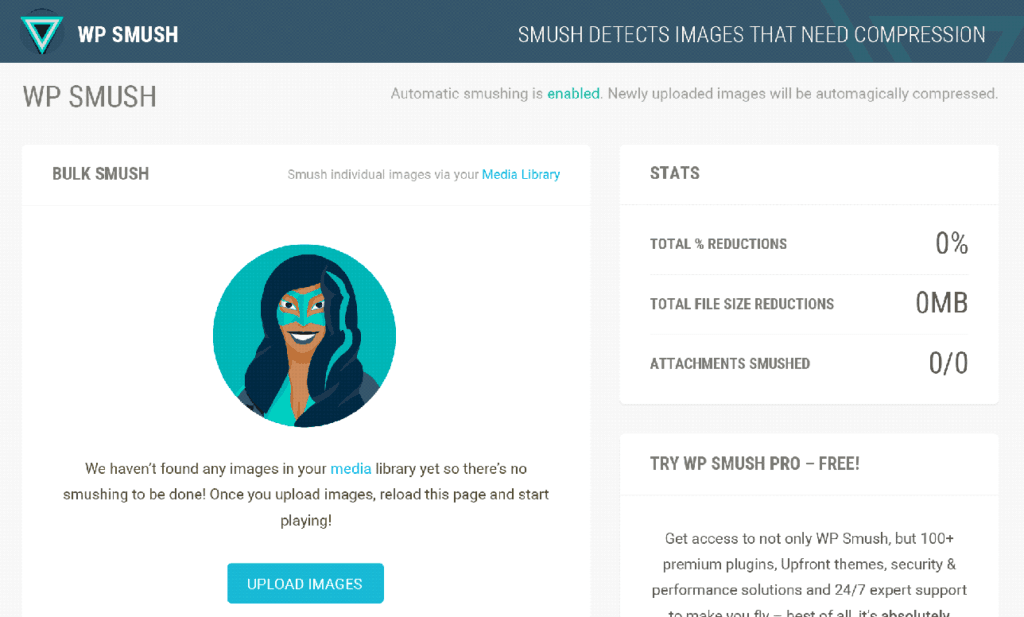 Smush is among the most popular plugin for WordPress image optimization. It is available in both free and paid or premium formats. This plugin compresses your images without really affecting its quality.
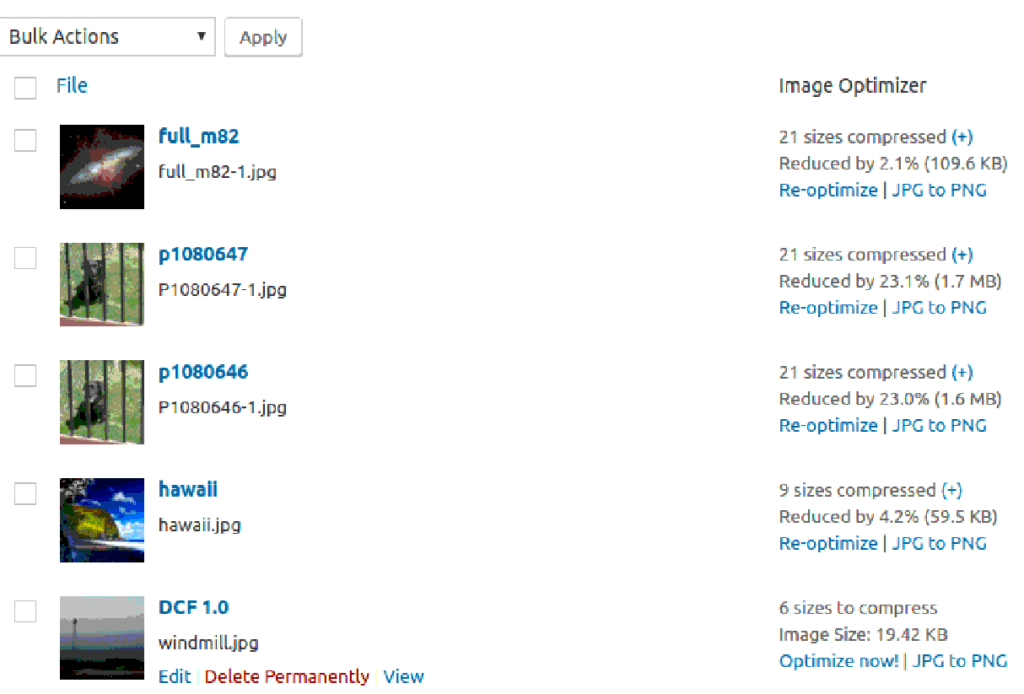 EWWW is another amazing and feature loaded plugin for WordPress. Installing and setting it up is quite easy. It automatically optimizes any images you upload to WordPress as long as it is of GIF, PNG and JPG file format.
 It is quite effective and one of the favorite choices of millions of people when it comes to image optimization and compression for a WordPress site.
  Kraken is a powerful WordPress image optimizer plugin which reduces image size to approx 80%. You also need not worry about the quality of your image as it assures you the least possible reduction in quality. Therefore you don't have to compromise quality wise for the sake of decreased image or file size.
 Short pixel is one of the most widely used image optimizer plugins for WordPress. The setup process of the smart pixel is also very easy. You just need to visit their visit and sign up there after that you will get your ID and password on your registered email.


 If you are planning to open an online shop but you do not want the hassle of having to build a site from scratch, then coming up with a WordPress eCommerce Store using

