

Laravel?s Envoyer is Ideal for PHP Deployment and Here?s How to Use
Developing a PHP application in itself is a quite exhaustive task requiring ample expertise and experience if you want it to be elegant and bug-free. But if you add to it the pain of deployment, the process becomes even more complex and cumbersome. While any reputed PHP application development company can take care of the first phase, it is the requirement of speed, efficiency and cost-effectiveness in the deployment process that elude many. And the solution too comes from a very similar place- Laravel. Besides being one of the top PHP frameworks, it offers, arguably, the best deployment tool- Envoyer.With the tag line of ?Zero downtime. Zero fuss?, Envoyer is known to deliver all that it promises. One thing, however, that it doesn?t reflect is the broad set of features that come along when you deploy your PHP application using Envoyer. Some of which include:- Unlimited project deployments
- Unlimited team members
- Multiple server deployments
- Seamless deployment rollback
- GitHub/Bitbucket integration
- Application health checks, and much more.

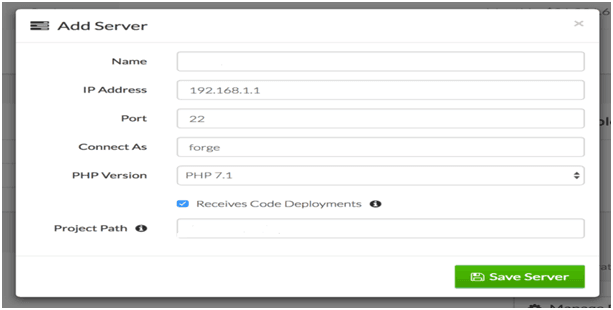
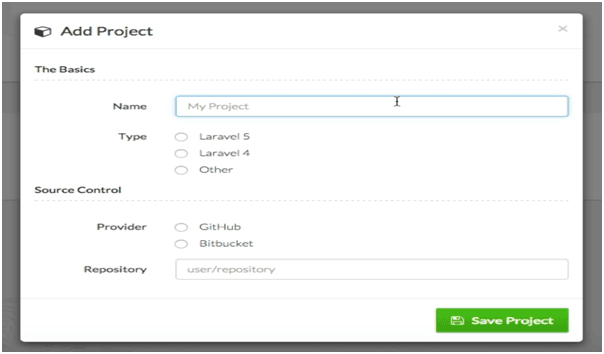 3. Add ServersAfter adding the repository, you need to add servers to your project from the ?server? tab. Envoyer allows you to add as many servers as you like, after which, you will be provided an SSH key to be added to your server. Add this SSH key to the authorized_keys file for the users you want to connect.Once you complete the process, hit ?refresh? to test the connection. Generally, Envoyer should be able to connect to your server and perform routine health checks. But if the connection fails, you need to white-list the Envoyer IP addresses to allow it to access your servers.
 4. DeploymentAfter your server is up and running, it is time for the final deployment, which quite literally, can be done by a single click on ?deploy? button. You also have the option to schedule to the deployment, to be automatically pushed in coherence with the code.
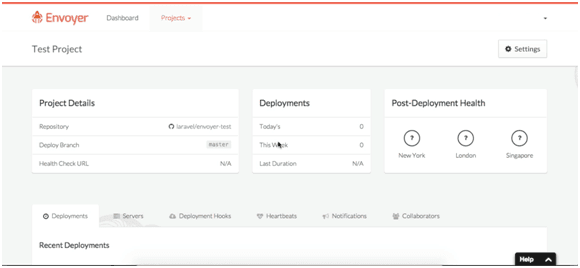 What?s more?As discussed above, it isn?t only the simplicity of deployment that makes Envoyer one of the finest tools but also the myriad of features that it brings along. After your application is deployed, you can simply setup heartbeat to monitor cron jobs and even setup notification channels like Slack and Hipchat to get notified of such tasks.Additionally, to prevent any downtime and rollback discrepancies, you can monitor the status of your application from three geographical locations (New York, London, Singapore), of which if any one suffers some breakdown or disaster, you can promptly switch to another.Final ThoughtsNo matter how robust or elegant a solution you get delivered by any PHP application development company, unless it is paired with equally robust and efficient deployment strategy, there is no way it can demonstrate its full potential.
