
Revid.ai Review: Best Faceless Video Channel Automation (20% OFF)make a
Use code WEBGUYNICK for 20% OFF or sign up here: https://www.revid.ai/?via=nick-throlson
What Is Revid.ai?
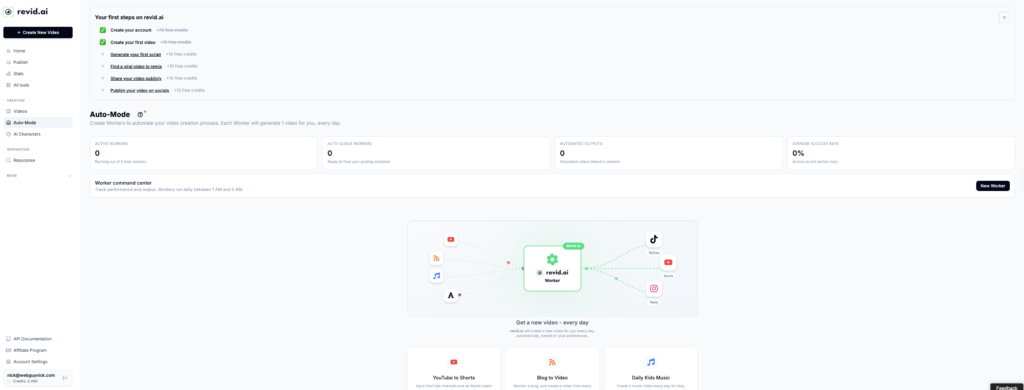
Revid.ai is an AI-powered video creation platform designed to automate short-form content for YouTube Shorts, TikTok, Instagram Reels, and more. It turns text, blog posts, audio, and long-form videos into optimized, social-ready clips with minimal manual editing.
Instead of spending hours in a traditional timeline editor, you feed Revid.ai your scripts, URLs, or recordings and let the AI handle cutting, captions, layouts, and pacing. This makes it ideal for faceless video channels where you never need to show your face on camera.
Why Revid.ai Is Perfect for Faceless Video Channels
If you run a faceless YouTube or TikTok channel, your biggest bottleneck is usually editing time. Revid.ai solves that by automating the most time-consuming parts of the workflow so you can focus on ideas, scripts, and strategy while the AI does the heavy lifting.
You can build entire channels around voiceovers, subtitles, stock footage, and motion graphics while staying completely off camera. This is perfect for list videos, tutorials, news updates, quote channels, and educational content.
Key Revid.ai Features for Automation
1. Text-to-Video and Blog-to-Video
Paste in a script, prompt, or blog post and Revid.ai will automatically generate a short-form video from it. The platform chooses scenes, layouts, and motion so your content feels native to modern short-form feeds.
This is a powerful way to repurpose existing articles, newsletters, and written content into faceless videos without starting from scratch.
2. Audio-to-Video (Podcasts, Interviews, Voice Notes)
Upload audio from podcasts, interviews, coaching calls, or even voice notes, and Revid.ai can turn them into engaging video clips. The AI picks out the most interesting moments and wraps them with subtitles and visual elements.
You can build a faceless “podcast clips” or “expert tips” channel by simply recording audio and letting Revid.ai handle the visuals.
3. Automatic Clip Generation and Smart Trimming
Revid.ai analyzes long-form content, finds high-impact segments, and automatically trims them into short clips. Instead of scrubbing through an hour-long recording, you get ready-made candidates you can approve, tweak, or discard.
This saves massive amounts of time for creators, agencies, and businesses that need multiple clips from the same source video.
4. Multi-Platform Aspect Ratios
Revid.ai can export your videos in vertical, square, and horizontal formats so you can publish to multiple platforms from the same project.
This multi-ratio output is crucial if you want to syndicate content to YouTube Shorts, TikTok, Instagram Reels, Facebook, and more without rebuilding each video by hand.
5. Templates, Branding, and Visual Styles
Revid.ai includes templates and style presets that help you keep a consistent look across your entire channel. You can set colors, fonts, overlays, and layouts so all of your clips feel like part of the same brand.
Once your template is dialed in, generating new content is as simple as feeding in fresh scripts, audio, or URLs.
6. SEO and Performance Suggestions
The platform also offers helpful suggestions for video titles, descriptions, and keywords to improve discoverability. This is especially valuable for YouTube creators who rely on search and suggested videos for traffic.
Revid.ai Pricing and Discount Code
Revid.ai is priced as a professional tool for serious creators and businesses. Plans are structured around monthly usage and export needs, with higher tiers for heavier publishing schedules and agency use.
While it’s not the cheapest AI video tool on the market, the time savings and automation can easily justify the investment if you publish content consistently.
To make it more affordable, you can use my exclusive discount: Use code WEBGUYNICK at checkout for 20% OFF your plan or sign up through this link: https://www.revid.ai/?via=nick-throlson.
Pros and Cons of Revid.ai
Pros
- User-friendly interface that makes automation accessible even if you are not a professional editor.
- Excellent for faceless video channels and short-form content across multiple platforms.
- Powerful combination of text-to-video, audio-to-video, and automatic clip generation in one tool.
- Branding tools and templates keep your channel’s visuals consistent.
- No watermarks on paid plans, so videos are ready for clients and channels.
Cons
- Pricing can feel high if you only publish occasionally.
- AI editing decisions are not perfect and still benefit from a quick human review.
- You still need a solid content strategy, niche research, and thumbnails for best results.
Who Should Use Revid.ai?
- Faceless YouTube Shorts, TikTok, and Reels creators.
- Agencies managing multiple short-form content clients.
- Podcasters and educators repurposing long-form content.
- Solo creators who want to post daily without deep editing skills.
Example Faceless Channel Workflow with Revid.ai
- Research and Script: Use AI or manual research to create scripts around your niche (e.g., tutorials, news, lists, tips).
- Create Videos: Paste scripts or upload audio into Revid.ai to generate batches of short-form clips.
- Brand and Optimize: Apply your template, tweak captions, and use SEO suggestions for titles and descriptions.
- Export and Schedule: Export in multiple aspect ratios and schedule across YouTube Shorts, TikTok, Instagram Reels, and Facebook.
- Review Performance: Double down on the topics, hooks, and styles that perform best.
Final Thoughts: Is Revid.ai Worth It?
If you are serious about building faceless video channels or scaling short-form content, Revid.ai is one of the most efficient automation tools available right now. It dramatically reduces editing time while helping you stay consistent across platforms.
With 20% OFF using the code WEBGUYNICK or my referral link, it becomes an even better value for creators, agencies, and brands that publish regularly: https://www.revid.ai/?via=nick-throlson.
Share this:


