A lot of business owners are completely insular. Whether it’s because they don’t trust others to help or because they’re stuck in their ways. Some simply don’t think others will care as much as they do. They’re probably right. However, when you enlist someone else's software, or knowhow, you’re a customer...and they’re a business owner too, who cares about their own business. So technically they’re in the same boat. You can really bump your business up to new heights by using people who have a deeper expertise in a certain area than you. You know your business, your product and your services, but you won’t know too much about other areas. These tips can help you take that leap.
Software Solutions
You won’t know about all the different elements of software available to you and your business. There might be some out there you’ve never heard of. If you’re a teacher you might not know of software for teachers to manage classroom laptops, and if you work remotely you might not know of the viable and cheaper alternatives to microsoft Teams and Zoom. A business analyst will be able to help you here. They know what works best for businesses and if you haven’t spoken to one yet you might find there are tools and tricks out there which you can buy which will cut down on process time, or make things easier for you and your employees. More importantly, it can make things easier for your customers.
Doing taxes isn’t easy. If you’ve just started out and don’t have too much to think about then you might be fine. When you’ve got a lot of money running through your business, the problems begin to start. Think about hiring an accountant to properly formulate everything and ensure you won’t get into trouble with the relevant tax authority. In a similar vein, you can just hire a tax specialist right off the bat. It costs money but getting it all right is worth it. Plus, there may be some deductibles or grants that you’re entitled to which you don’t know much about. You could end up saving even more money. Even if you just have a consultation, it’s worth doing that bit of research to get there.
Market To Success
Marketing isn’t easy. A lot of business owners will take things into their own hands and to be fair, a lot of them are quite successful. But as your business takes off, marketing becomes a secondary to the actual work you’re trying to do. This applies to pretty much all businesses. You grow with the marketing you’ve done and take your foot off the gas to focus on the business, then the orders start to slow. The important thing to mention is that there are experts in every field from Amazon, to alibaba and beyond. Marketing is different in each niche, so it depends what you want to target and from which industry you’re operating from. Help marketing means you get to focus on your business while the orders still come in.
CryptoCurrency is skyrocketing the time is now to get into the future we all know the dollar bill and coins are old news they will still be accepted currency but digital currency is a much-needed thing to regulate a lot of money is to be made.
I recommend using the leader CoinBase.com recommend holding your currency in a Digital wallet.
Website, web app, or mobile app — how should your business show up on the web? In a mobile-first world, you might think a mobile app is an obvious choice. However, in many cases, there are also big advantages to building a web app instead. Here's how to decide what's right for your business and how to get started developing your first app.
Web apps: Websites, amplified
Yes, web apps are technically websites. But web apps do so much more than your standard business website. While websites deliver information, web apps provide interaction and personalization. Examples of popular web apps include Gmail, Pinterest, and Trello.
Does that mean every business should opt for a web app over a website? No! If your needs are primarily informational, a mobile-friendly website is enough. Plus, with a custom WordPress site, you can utilize plug-ins to create whatever functionality you need.
When to go mobile
Web apps offer a lot of advantages over mobile apps, including:
Affordability.
Discoverability.
Accessibility.
Easy to update.
Nonetheless, sometimes a mobile app is a better choice. If you need a full-screen experience, the ability to send push notifications, or the native functionality of mobile devices (e.g., camera, GPS), opt for mobile. Mobile apps are also a great way to encourage customer loyalty for frequently-used services — think Uber or retail rewards.
So you want to build an app ...
You've settled on a mobile or web app for your business. Now what? These steps will bring your app idea to fruition.
Goals, audience, and objectives
A clearly-defined vision is key to developing an app that's both user-friendly and useful. Once you've established the app's purpose and target audience, define key performance indicators. These may include:
App downloads.
Active users.
Session frequency.
Session length.
Conversion rate.
Brand awareness.
Sketching
A basic sketch-up helps a developer bring your vision to life. Sketching lays out the user interface and flow of an app and provides the framework for an app's user experience. You don't need to be an artist or a developer to start sketching your app. Sketches are merely a simple way to flesh out your app idea.
Hiring an app developer
Cost is the first thing on most business owners' minds when hiring an app developer. However, there's more than the bottom line to consider.
Project scope: Mobile or web? iOS or Android? Simple user experience or complex? Make sure the development team you hire has the right skills for your project.
Portfolio: Testing apps in a developer's portfolio is a great way to get a feel for their work, particularly user experience and interface design.
Communication: Finally, you need someone you work well with and who can work efficiently with others on the development team.
Pricing
Will your app be free, paid, or freemium? If you charge for your app, will it be a flat fee or a subscription? Keep in mind that app sales aren't the only way to generate revenue. Ads and in-app purchases generate revenue even for “free” apps.
Testing and monitoring
Thorough testing ensures the public sees only the best version of your app. However, the work isn't over once your app launches. Ongoing monitoring lets developers fix problems before they impact your business.
When measuring an app's performance, do so from the user's perspective. End user experience monitoring lets teams monitor launch time, response time, crashes, and other important user experience metrics from the user's point of view. Unlike device performance monitoring, which instruments the device, implementing end user experience monitoring requires instrumenting your app with an SDK or mobile wrapper before releasing it on the app store.
Marketing
The biggest obstacle to a mobile app's success is getting people to download and use it. Customers don't search app stores the same way they Google, so businesses have to get their apps in front of consumers' eyes another way.
This includes pre-launch marketing to build anticipation, such as teasers, sneak peeks, and content marketing, as well as post-launch marketing in the form of reviews, search ads, and notifications.
Mobile and web apps are excellent tools, but they’re not right for every company. If a mobile-friendly website is a better fit or you’re not quite ready to make the leap into app development, contact Web Guy Nick to learn how you can create a functional, dynamic website using WordPress. With an engaging, responsive, and mobile-friendly WordPress site, you can grow your business and stand out from the competition.
Paid Media experts often reevaluate and experiment with ways to optimize processes and get the most results. After all, the world of Facebook Ads can be daunting, and you certainly don’t want to follow in the footsteps of one man who lost 600k in 4 days on his Facebook Ads. Ouch, that hits us where it hurts.
Even if you’re not an expert, there are probably (definitely) a few things you could do right now to save money on your Facebook Ads. And if you’re a human being, that is something you should want. Let’s take a look at some you can correct today:
You’re picking the wrong campaign objective
Although this may seem obvious, you’d be surprised how often this crucial element gets overlooked when launching an ad campaign. Facebook Ads campaigns break down into three main objectives, each with their own sub-objectives.
Before you get to this stage, you should have already identified your Facebook Ad’s purpose and the results you want to see. (If not, we suggest doing that now). The objective you select should fit into your overall business strategy and serve as a shorter-term tactic to achieve long term goals. Once you know your objectives, it makes writing your ad easier, since you’ve determined who and what you’re writing for.
Source: Business2Community
The three campaign types are:
Awareness: this objective is for those at the top level of your marketing funnel, who may not even know you exist. It’s also commonly used by larger brands when they have new products services.
Ad objectives for Awareness are:
Brand awareness: letting people know who you are. Where you are or what you do.
Reach: casting as wide of a net as possible, and having the most eyes viewing your ad.
Consideration: this objective would be for those in the middle of the marketing funnel, who may know you exist but need to have more information before converting into a customer. You want to guide your potential buyer to want to take action, whether through education, information, or entertainment.
Ad objectives for Consideration are:
Traffic: sending users from Facebook to a designated URL such as a landing page or official website.
Engagement: motivating those who see your ad to engage in any way through likes, shares, comments, or clicks.
App installs: driving users to an App Store where they can download your mobile app.
Video views: shows your video to those most likely to be interested and interact with the content.
Lead generation: allows you to capture data and leads directly from your ads, such as address or email.
Messages: connect users with messaging services like Facebook messenger or Instagram Direct messages.
Conversions: as you probably have guessed, this would be the ad objective for an audience towards the bottom of your marketing funnel. It’s the final step before taking action and making a purchase, download, or signing up for a subscription.
Ad objectives for Conversions are:
Conversions: Having your audience take a specific action. Download. Sign up. Purchase. To optimize this ad objective, it’s ideal if you’re having at least 15-25 conversions per week; that way, Facebook can garner enough data to advertise to the right target audience correctly.
Catalog Sales: allows you to showcase specific products from your e-commerce store and gives you tools to integrate your online store products into the user’s Facebook feed.
Store traffic: meant for brick and mortar stores that rely on foot traffic for sales. Think establishments like a hair salon, restaurant, or local boutique.
You’re not using audience targeting correctly
The targeting feature of Facebook Ads ensures that you have influence over matching the right ad with the right person. Some people may “target overkill,” which leads to a tiny pool of Facebook users who may see your ad. Some may use “lazy targeting” and follow a “set it and forget it” approach. Both of these leave room for improvement.
Neither specific nor broad targeting is more superior; the critical element is relevance to the user. We’ve all been the victim of a mistargeted ad and wondered, “why am I seeing this right now?” That does not make for positive brand sentiment.
When it comes to components of detailed targeting, Facebook Ads allows you to choose from a lot of options., but they all fall under the following:
Demographics: under this category, you can target users’ age, location, languages, education, gender, and even relationship status. What industry does your potential buyer work in? What is their income range? What life events are they experiencing? All of these need to be considered when considering your demographics targeting.
Interests: exceptionally useful in placing your ads in front of those who will want to see it. You can select interests based on industries, like finance or medical. You can target based on family relationships such as parents or dating. And, you can target based on activities like sports, technology, and fashion.
Behaviors: this allows you to reach people based on purchase behavior or purchase intent and includes behaviors like device usage. These behaviors could be how charitable a person is, their job role, residential profiles, and even how much they travel.
You can use a layered approach when it comes to these audience targets to achieve the maximum return on your ad. Facebook provides an audience size tool (below) that shows how broad or narrow your target approach is. It might take some trial and error for a beginner, which is why it’s always good to do your research or hire the experts.
Although Facebook Ads strategy can be scientific and experimental by nature, your ad’s creative aspect has a massive impact on its success. When we say creative, we mean the imagery, text, placement, colors, headlines, videos, CTA’s - all of it.
It’s important to note that creating the right ad will require testing different versions to see which resonate and perform the best. A simple A/B test of varying headlines or images combinations can provide valuable insight and save valuable dollars.
There are some best practices when it comes to creating your ad that is best to follow closely:
Use high-resolution images (FYI best size guide on FB. Image 1:1, video 4:5 or 1:1, story 9:16.)
Show your product clearly.
Avoid too much image text: let the creative aspect of the adconvey messaging and don’t overstuff ads with text as it fails to gather attention.
To use multiple images or showcase various products, test multiple formats as different formats work for different products, such as Facebook carousel ads.
Preview your ads using Facebook Creative Hub; this will give you a good indication of how users will see your ad on a desktop or mobile.
Have the ad copy reflect what is being shown in the image, make it easy for viewers to connect the dots.
Have one clear, prominent call to action, whether it’s “Sign up now” or “Buy one today!”
Use simple language that’s easy to understand. Remember that your ad is one of many in a sea of infinite scroll, and you have your audiences’ attention for a very limited time.
Let’s take a look at some great and not-so-great Facebook ad examples:
Source: Facebook
Why this works:
The image chosen is meant to catch a user’s eye.
The text relates directly to the ad, making the connection an easy one to make
The copy leads with value and gets right to the point; “Stop Counting Calories and Take Inches Off.”
It’s clear what the user should do: take part in the 30-day challenge.
Great use of social proof and high engagement
Source: Facebook
Why this doesn’t work:
Although there’s a catalog of images, none of them are particularly engaging or stand out.
The headline is generic and isn’t clear on what action they want the audience to take
The image text is basic and lacking much creativity. “Deer Lamp” isn’t all that enticing.
The social proof is evidence of an unengaging ad that isn’t catching people’s attention.
Remember that your ad should be telling a story about who you are and what you offer in a cohesive, obvious way. There should be a flow between what the user reads and what they see, and it should be clear what you want them to do.
You’re not using Facebook Pixel (properly)
Here’s a crash course on Facebook Pixel 101: the Pixel is a piece of code that you can place on your website to analyze the actions users are taking. It’s a great analytics tool that provides some invaluable insights into your own specific consumer’s behavior.
It tracks things like time on page, page views, page depth, and add to cart functions. There are 3 main ways to take advantage of this tool:
Target to the right audience: the Pixel will give you information about those who’ve visited your site, allowing you to remarketing to them on the Facebook platform.
Increase sales: well, this seems like a no-brainer. With your Pixel information, you can set automatic bidding strategies that reach people more likely to take the desired action.
Measure your ROI: the information provided from the Pixel gives specific data into which ads are high-performing, where to make adjustments, and how effectively your ads are driving action.
Source: Facebook
The Pixel transgression made by businesses is often they are either not using it or not using it to its full potential. Facebook makes it very easy, too. You can view all of your Pixel data right inside your ad manager and make adjustments based on the data you see.
The pixel gives you information on how customers are interacting with your business off of the Facebook platform, so you can create strategies to have them engage with your business on the platform, through your ads. You should be consulting this data to guide strategic decisions like audiences to target or even your website’s flow.
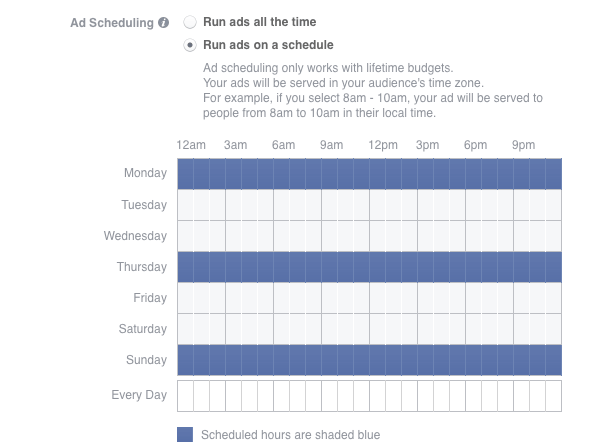
You’re not optimizing ad scheduling
As we know by now, you can set your ads’ schedule of when they are shown. You can choose the time of day, or day of the week, based on your offer and relevancy.
Source: Facebook
Sure, it seems obvious to run your ads during weekends or evenings, where you assume most people might be online. Still, we’ve found the way to create your ad schedule is to analyze your specific customer data (like the stuff you get from Facebook Pixel). Once you’ve done that, it’s essential to look at your ad intent: what am I trying to get them to do? What time of day, or day of the week, are people taking this action?
Combining Google Analytics, Facebook Pixel, and Facebook Analytics, you can determine more than when your audience is online, but when they are taking these specific actions. You can see when they are subscribing or signing up, and when they are buying.
It’s best to analyze this data to create a custom ad schedule, specific to each ad. Now, we know this can seem a bit overwhelming. Check out what happened when we teamed The Maple Guild to implement a Facebook ad strategy that increased their revenue by 300%, and their purchases by 200%.
Take it from us, working with Facebook Ads is a never ending lesson, as there are always ways to improve and optimize your efforts to maximize your results. We’ve run thousands of ad campaigns for all kinds of businesses and have used that expertise to help you save more money on your Facebook ads.
If you're looking to launch a small business selling items or services on the internet, you need to build an online store. And now is the perfect time to do that. The e-commerce industry is booming and expected to top $4 trillion this year.
But if you want the best possible outcome from your online ventures, you need to pick the right software for your shop. Choosing the appropriate platform is an important decision that can make or break your business. The thing is that different marketing strategies need different platforms to succeed. Software that's good to promote cool online games like Booster Slot would simply not be as effective in selling hand-made photo frames.
The online market is full of options, and this article is here to help you make a balanced decision and pick the software that fits your business needs. We'll take a closer look at the key factors that you should look for in a platform. Sounds good? Let's dive in.
Reasons to Use E-Commerce Software
The thing is that anyone who wants to stay competitive in the online world has to do it via an e-commerce platform. It doesn't matter whether you have a B2C or a B2B company, using an e-commerce platform for your services gives you an efficient way to communicate with clients and employees.
An e-commerce platform handles the most important functions of both the interface and back-end systems. Your inventory, CRM, web design, etc., can all be managed by the platform. It wasn't that long ago when online companies were required to hire a full IT team to develop their in-house software. But this approach has never been cheap. That's why most businesses these days have opted to use low-cost open-source platforms that are developed by specialists and can easily be customized.
The Different Types of Platforms
All e-commerce platforms fall into one of the 5 following categories:
1. Open-source platforms
Open-source platforms do not ask you to pay anything to start using them. The license is free. However, there are fees for implementation, upgrades, and development. Magento, for example, is an open-source e-commerce platform.
2. SaaS platforms
A SaaS e-commerce platform's architecture is usually based on a single codebase. A fixed monthly fee gives you server space and covers the maintenance and security costs.
3. Traditional e-commerce platforms
With traditional platforms like Hybris, Kentico, or IBM Digital Commerce, you can pay the license fee once a year. But you still need a knowledgeable IT team to build the shop on top of the provided platform.
4. Cloud platforms
Many traditional e-commerce platforms, like Salesforce, or Demandware, are using a cloud hosting system. That's why they call themselves cloud platforms.
5. DIY platforms
Building your own platform is the least common way to operate an online business these days. But sometimes a niche business has so specific needs that they need more than a regular e-commerce platform. Using a full team of developers to come up with fully customized software might be a worthy investment for them.
Main Factors to Consider When Picking a Platform
1. SEO
Picking an e-commerce platform with the best SEO features assures that your site will rank high in Google's search results. Make sure that the platform allows you to pick your own domain name, and enables clients to leave reviews.
2. Support
There are lots of things that can go wrong with your e-commerce venture, so pick a platform that provides 24/7 support.
3. Order Management System
E-commerce platform design with features like email notifications and order tracking ensures that the orders get to the clients on time and accurately. Go with a platform that can interact with your inventory management solutions so that the customers could only purchase the in-stock items.
4. Scalability
At some point, your business will start to grow. And your chosen platform has to be able to keep up with the expansion.
5. Security
Your e-commerce software will be actively handling payments and your clients' financial information. So it needs to be as secure as possible. Look for platforms that have features like Secure Electronic Transaction (SET), Secure Socket Layer (SSL), and a safe login screen.
6. Mobile-friendliness
Have you ever looked at how an e-commerce platform works on a mobile screen? Mobile commerce is on the rise, and your shop should be easily accessible via a smartphone.
The Best e-commerce Platforms for Selling Video Games
Selling video games online is the best way to do it. All you need to reach an audience is a well-functioning online store. The most important thing in choosing a platform is analyzing the following factors:
the overall expenses
how many other video game sellers are using the platform
shipping options
Here are some great e-commerce platform examples that people have used successfully for gaming-oriented shops:
Magento
Magento is one of the most secure platforms out there. It has a free open-source option and a paid commerce option. The cool thing is that thanks to its numerous built-in features, you don't need to install an endless list of extensions.
Shopify
No e-commerce platform list is complete without Shopify. It's a secure and user-friendly platform for selling any kind of products, including video games.
WooCommerce
WooCommerce comes with some pretty cool features like tax calculations, geolocation, and the latest shopping cart software. Plus, the platform offers its users over 4000 plugins to make the shop-building process easier.
Conclusion
These were our tips on how to choose the best e-commerce platform for your business. There's no need to go blindly with the most popular names. Instead, use the advice from this article and pick the most suitable software for your shop. And look: you don't have to get it right with the first software you use. Narrow your choices down to at least two different platforms and test them out. Soon, you'll find the one that works best for your particular business.
What are some of the best e-commerce platforms for small businesses that you've used? Let us know your favorites in the comments.
Author's Bio
Alex Norwood is an experienced traveler and an online entrepreneur. He runs a successful eCommerce business and is always on the lookout for new lucrative ways to make money online. Traveling is Alex's passion, and he has visited over 20 countries in the last 5 years.