When creating your own website, there is so much that you need to take into account. Are you building this website as a part of your business? Is it a passion project? Are you just wanting a platform where you can post your ideas? Portfolio maybe? Regardless of the reason, you’ll need to know where you’ll want to have your website (such as WordPress), the hosting company, and most importantly your domain. Your domain name is very important because this will be a part of your brand. This domain name will be how you can establish your website, but also yourself online.
When deciding on a domain name you’ll need to do a lot of research. This domain needs to be available online unless you’re willing to pay a hefty amount to purchase someone else’s domain. But your domain name should also be something that is easy to remember and doesn’t come off as spammy.
If you’re interested in having your own website, be sure to take a look at the infographic below. This will help give you an idea of what your name should be as it must tie into your brand. This infographic is a fantastic way to demonstrate how the domain name for the website should be something easy to remember, that sticks to your brand, that’s SEO friendly, and overall just a name that will help you reach the traffic your website deserves. Be sure to check it out below to learn all the ins and outs of choosing a domain name.
If your business was fully efficient, you may see your revenue increase by up to 30%. That’s no small sum to be sniffed at. That could mean the difference between going out of business or beating your competitors to the punch. Efficiency is all-important in business. Bad efficiency means that time and money is being wasted on useless and outdated tasks, and all business owners should be looking to avoid that. You need to find out where all the inefficient areas are and look to improve or eliminate them. In some cases, you may be able to merge tasks or simplify them. This is completely dependent on your business model and how easy change is to implement. Anyway, below are some ways you can improve the efficiency of your business:
You will need to do a investigation into all the tasks and processes that are being conducted in your business to work this out. And as you will discover, inefficiency can rear its head in various places. You are going to find redundant tasks that need cutting out, as well as, important but out-of-date tasks and processes and overly complicated processes among a whole range of other things. You need to cut the chaff, so armed with the knowledge of tasks, you can start making executive decisions.
Automate Tasks
Some important but labourously labour intensive tasks may well need to be automated. There are so many tasks that can be automated these days. If you are still using people for these tasks then you are going to be falling behind and wasting money. Do some investigation and speak to your teams as well as IT to discover what tasks can be automated. Once you have succeeded in automating some tasks, you will have more man-hours to put to use on something far more fitting for a human being.
Upgrade your Tools and Software
If you want better efficiency, then you need the best tools and software. Have you been using the same software since the 80’s for example? Okay, maybe this is an exaggeration, but you see the point. Software and tools of all kinds have been going through a sort of revolution in efficiency, power, and environmental factors. You need to do some research and find out new ways of doing things. How about a new POS (point of sale) solution, for example? Well, to get the best in the business you'll need a merchant account, but once you do, you will benefit from quick online sales, among other things. However, don’t go mad and implement loads and loads of new system thought. This is confusing and could waste time in itself. You need to prioritise and work out what exactly is best for your business to improve efficiency.
Your Staff
Your staff run your business for you, so if they are not engaged and happy, it is going to have an effect on efficiency. Put some time and effort into building morale and creating a culture everyone can be happy with. You want your staff members to feel important to you as if they matter and are an integral part of your company.
These days, people are tracked everywhere they go online. Companies want to collect as much data as they possibly can about internet users, and hackers are always looking for opportunities to breach their defenses.
Recently, there have been a number of high-profile stories that have gone viral discussing just how much the average person is being tracked. The level of detail that corporations now have about individual users is downright scary.
Remember, even if you avoid the major platforms like Google and Facebook entirely, these behemoths have vast third-party networks of websites that still track you and provide them with data. So what can you do?
Tracking IDs are the traditional way that third-party websites keep tabs on who you are and what you’re doing. Typically, they take the form of cookies - small files stored in your browser that you can delete periodically. Many people like cookies because they negate the need to continually reload web pages, speeding up surfing of the internet. But they are also a liability if you care about privacy. Through them, brands and other organizations can see exactly where you are going and what you are doing.
One way to stop this is to go into your browser settings and prevent advertisers from leaving cookies on your computer. If you try this approach, you’ll stop transferring data to them that they can use to market to you. However, there are some tradeoffs. So, for example, web pages will load more slowly if you disallow pre-caching on your browser. You’ll also have to put up with less targeted ads, unless you have an ad-blocker.
Location IDs
Even if you disabled cookies, brands and advertisers can still track you using your location IDs. These are little packets of data that give you geolocation - usually because you’ve turned on your phone’s GPS system.
Service providers can track your location regardless of your setting by using signal triangulation. The estimate your position by timing how long it takes to send a signal from various masts to your phone and then receive it back again.
In many countries, you have the right to hide your location. If you’re using a home computer and you don’t want anybody to know how you are connecting to the internet, your best bet is to use a virtual private network (VPN). These mask your IP address and prevent third-party companies from determining your precise location. Look for a VPN review on the services that you want to use to check if it is suitable.
Signing Into Accounts
Once you sign into an account, it makes it much easier for companies to track you. In some situations, like Facebook, you need to sign into your account to use the service. There’s no way around that. On Google, you don’t have to sign in, but the search giant uses every opportunity available to convince you that you should.
If you don’t like individual companies tracking you, resist the urge to sign in. Also, use services from different companies that are more committed to protecting privacy.
Although it is widely regarded that death and taxes are the only certainties in life, those who run a business know of expenses. No business manager likes to see the costs. As a business owner, you should always be looking to minimize costs as much as possible - without compromising safety and integrity, of course.
Accountants are widely employed to scrutinize a business’ income and outgoings, but they can be expensive and, in many cases, unnecessary. While no one suggests that accountants don’t have their uses, they may not apply to your business as much as you may think. For example, keeping track of finances is made easy with modern apps.
Other ways you can save money covered here, include:
Effective management software
Using free software
Outsourcing
Embracing the paperless office
Employee and client retention
Use Management Software
Any business knows that legal issues can all but eradicate a company. Insurance, copyright, and embezzlement are common issues with which a modern business has to contend. But there are obfuscated problems that can begin relatively small and end up causing a massive legal headache if not promptly addressed.
For example, employee resignation or termination can cost your business dearly - up to $4,500 per member. This is because filing for unemployment passes their payment cost to you. Unemployment claims management software can help. Specialized software like this keeps track of all terminations or resignations and actively tracks costs incurred.
Conduct An Energy Audit
Energy bills can be a huge expense for many businesses. Conducting an energy audit can allow you to assess your energy usage and make cutbacks in places where you may be using too much electricity. Some of the biggest ways in which companies overuse energy include not using LEDs, using old/inefficient HVAC and using old appliances. To help you carry out your audit, consider hiring energy consultant services - they will know exactly which areas to look into.
Make Use of Free Software
Any business, small, medium, or large, can make use of free stuff. Software licensing is one of those everyday expenses that almost every company is aware of, and some of them are almost scandalously priced. However, you may not be aware that some of the best software is free.
Take Microsoft Office, for example. You may need to shell out for an expensive volume license and renew it annually. However, Google Apps offers a similar package that is almost a good as MS Office, absolutely free for commercial use. For the most part, you won’t need to pay a penny, but you can add extra features at additional costs.
Other excellent free software includes:
GIMP - powerful, free image manipulation program.
Avira - high-end free antimalware.
Linux - various versions of free operating systems.
Free CAD - excellent CAD software.
Lightworks - superb video editing program.
Mautic - powerful, free email automation.
Wave - free financial software similar to Quickbooks.
Blender - a great alternative to MAYA and 3DS Max.
Of course, some of the best packages will cost money, and you might eventually require them. But for a startup when money is tight, some alternative free software should be good enough to get you through until you can afford more robust, industry-standard packages.
The same could be said about the hosting for your website, however, there is a difference here. If you decide to start with a free website, you will be restricted with what you can do. In the long run, it might be better to start with some cheap hosting rather than free hosting. One of the main reasons is the freedom that you are granted with a self-hosted platform. Not only will you be completely in charge of the content, but you will also have something which is completely yours. Unfortunately, when it comes to free websites, there is not that level of choice.
Self-hosting also allows you to customize your website name and make it appear more professional to potential clients and customers. If you decide to cut costs by using a free platform, you run the risk of putting people off with a Blogspot or Wix address in the address bar. You can see how this might be off-putting to people. In a world where first impressions can make or break a business, you are better at putting your best foot forward with a customized address and self-hosted website. In some places, it can be a good idea to trim back the costs, in others, you will need to spend a little money in order to make a lot.
Outsource Where You Can
The employee wage bill is the biggest cost a business has. But this can be reduced significantly by outsourcing departmental work wherever necessary. This doesn’t mean drafting the help of unqualified and belligerent individuals from another country. There are tons of outsourcing services available across multiple disciplines.
An excellent example is managed IT services. These companies provide IT and network-related services at a fraction of the cost of hiring a full-time, in-house network administrator or cybersecurity expert. Call answering services are another great example. Hiring a floor of qualified administration personnel is a considerable expense, so take advantage of a service that already employs professional admin staff who can do it for you.
Explore the Paperless Office
One of Bill Gates’ personal and professional goals is to eradicate paper from the office, which is why Microsoft invested so heavily in their flagship office programs. The reasons for Bill are personal, but the principle applies to everyone, especially in today’s world of carbon footprint reduction and sustainability goals where the reduction of waste is a priority.
There are many ways that you can reduce costs by implementing a paperless office. Electronic comminution only rather than printed materials is a prime and practical example. Apps like Note, DropBox, and even email clients are widely used. In addition, you could consider digital business cards with apps like SnapDat and encourage employees to take notes with smart devices instead of paper pads.
Retain Clients and Employees
While paying employee wages is a considerable expense, losing an employee can be just as significant. The cost of replacing a talented employee is considered equal to that of one year’s salary for that employee. This is because you will need to initiate a costly and complex campaign to locate someone equally skilled. You will then need to train them in company procedures, pay a recruitment company to go through various procedures, and suffer losses due to a vacant position.
Additionally, losing a client can be an expensive affair. Loyal clients who engage in repeat business tend to spend around 60% more than standard clients and are essential for maintaining high income. Should a client of this nature be lost, it could spell disaster for your revenue stream. Building trust and consistently delivering on promises will help ensure a long and happy relationship.
If you’re running a business that handles lots of contracts, chances are, you could benefit from hiring a contract manager. This is a relatively new role for many businesses to consider, but it is one that can help your business to operate in a much more streamlined and productive manner. At the end of the day, contracts are essential for any expanding business. Even if you largely deal with the general consumer market, chances are, you have contracts with suppliers, manufacturers, couriers, freelancers and others to keep everything up and running. Here’s more information on the subject to help you determine whether this is a useful recruit for you!
What is a contract manager?
Let’s start out by defining what a contract manager is and what they do. Put simply, a contract manager is an individual in a company who is responsible for the management and administration of contracts. They will also likely take responsibility for the processes in which contracts are agreed, created and signed. They will use tools specific to the industry you’re working with to complete their work. For example, a hospital contracts manager may use hospital contract management software to complete their role to a high level.
What does a contract manager do?
A contract is a piece of legal documentation between you or your business and another party you are deciding to work with. A good contract manager will make sure that these documents move smoothly, accurately and quickly from the point of agreeing to use or provide someone else with services to the work being carried out, completed and paid for. Your contract manager will create contracts, collaborate and negotiate with third parties until everyone’s in agreement and ensure that they are signed. Your contract manager will then make sure that all contracts are saved and stored securely in an organised manner that allows contracts to be pulled out as and when required.
Skills to Look For
If you feel that your business requires a contract manager, it’s time to get the recruitment process started. But what should you be looking for in potential candidates? Here are some key skills that can come in useful.
Analytical skills: your contract manager should be able to analyse the different contracts they’re working on and provide key data or metrics that let you see how you are doing with contracts and what can be done to improve the workflow.
Negotiation: chances are the third parties will do all they can to swing contracts in their favour. Your contracts manager will need to be a good negotiator to leave everyone happy with the transaction at hand.
Attention to detail: as you can imagine, contract managers have to pay a lot of attention to detail to ensure that there aren’t any loopholes in the contracts they’re working on.
Use of integrations: the majority of businesses will use different software integrations to compare contract data to other relevant aspects of the business’ operations. See what systems applicants are used to using.
Creating KPIs
As with any other position, your contract manager should have KPIs to prove their value to your business. There are a number of ways you can set fair and achievable KPIs, but they key element here is making sure that the KPIs reflect your contract manager completing their responsibilities. They should:
Manage or assist with creating positive subcontractor and vendor relationships
Provide the key benefits and risks of any commercial contractual relationships
Negotiate preferable changes to contracts that benefit your company
Ensure new and existing contracts are legally sound
Review customer contract terms and conditions
Does Your Contract Manager Require Legal Experience?
Sure, a knowledge of the law can come in useful when managing contracts. But your contract manager doesn’t necessarily have to have an extensive legal background. As long as they know the laws, rules and regulations of the industry you’re working in, they should be fine to carry out the role.
Of course, not every business will require a contract manager. But if you do deal with a lot of contracts, it will quickly become a pretty integral role within your company, contributing significantly to your success. Hopefully, some of the insight provided above will help you to determine whether you could benefit from a contract manager and what you should look for when hiring one. The recruitment process can be drawn out, but it’s definitely worth waiting until you find the right candidate who you feel you can trust and who has the necessary personality, skills and experience for the role.
Professionalism is a big thing in the online game. With so many websites competing for traffic, you need to stand out from the rest and prove your professionalism. If people think your site is professional, they are more likely to click on it and see what's going on. Once there, a professional-looking site will keep people on it for longer and boost your chances of converting users to leads or customers.
Building a professional site is crucial, and here are three easy steps that will instantly make yours look a lot better:
Build on a reputable platform
Firstly, build your website on a reputable platform that people trust. Users know a few of the big website-building platforms around, like WordPress, Magento, Shopify for eCommerce, and so on. Having a site on one of these platforms instantly ensures it looks the part. You will enjoy modern web design, but you also benefit from the authority that these platforms provide. If people see that you're using them, they instantly find you more trustworthy and professional.
Well-known platforms are also becoming a necessity of business as more and more companies undergo data migration (read more) to cloud-based microservices over traditional monolithic applications.
Get HTTPS on your domain & get a professional domain name
Your domain name impacts professionalism massively. It's the address people see when they go to click on your website in the search results, and it's at the top of their screen when they're on your site. Even if you've built yours on a trustworthy and professional platform - and it looks amazing - people will think less of your site if the domain name is unprofessional. It should relate to your business, and shouldn't contain any numbers (unless they're in your brand name). The ideal domain names are just that; your brand name. Don't overcomplicate things here as a good domain improves professionalism.
Likewise, you need to use HTTPS on your domain as well. This basically shows that you have an SSL certificate, which is fancy talk for saying that your website has a secure connection. Anyone that uses it will feel safe knowing that their information is protected - particularly if they have to pay for something on your site. A lack of HTTPS on your domain looks unprofessional, so make sure you acquire an SSL certificate.
Optimize title tags and meta descriptions
If you look at the anatomy of a search results page, you will see that all of the organic results follow a similar structure. You have the title of the page being displayed, the URL, then a little snippet below. Here, you can make your site look more professional by optimizing your title tags and meta descriptions. Doing this will make sure that you have eyecatching titles for every page, drawing the user in. It will also ensure you have a useful snippet providing more information for them to see. Both of these things are basic SEO techniques, but they make a website look far more professional in the search results - particularly if other results don't have optimized titles or descriptions!
Want to make your website look more professional in a matter of minutes? Try any or all of these ideas, and watch the benefits flow.

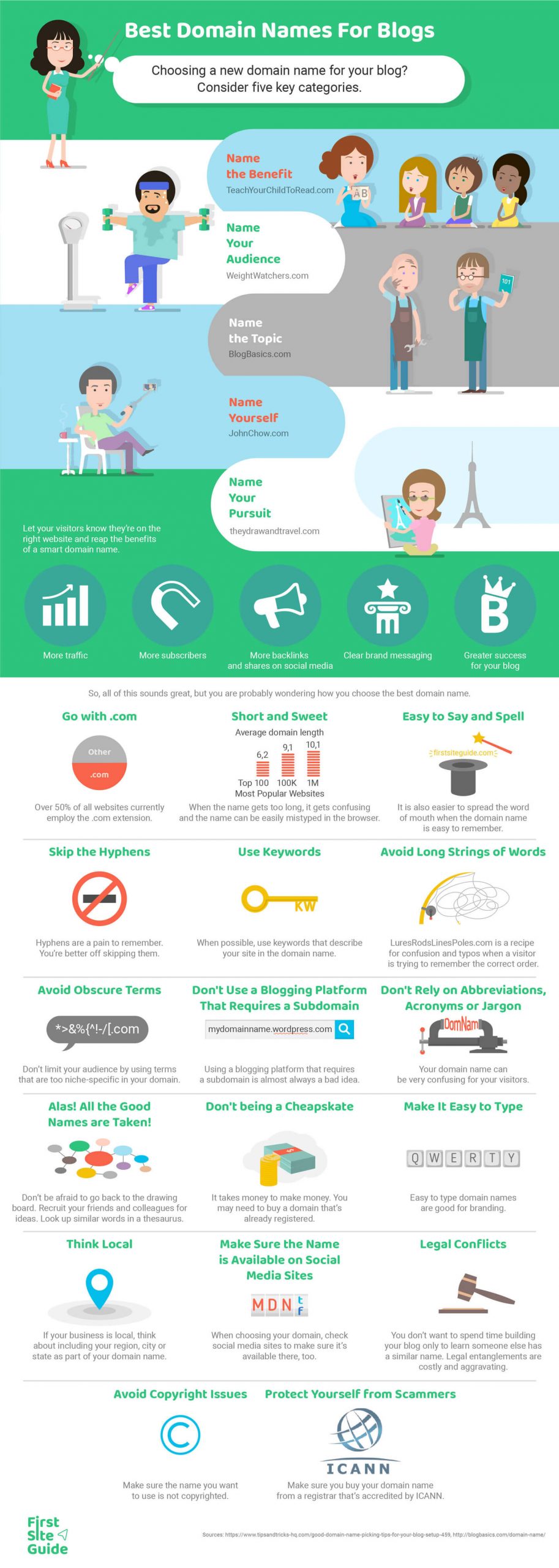


 Image Courtesy of