

SendPulse Review: More than Just an Email Marketing Software
SendPulse combines email service, web push notifications, and SMS into one powerful product that?s not just packed with features, but is insanely affordable. Seriosuly! When you register for SendPulse?s free plan, you get access to the following:- Email Marketing - You can create and send emails with SendPulse?s easy-to-use drag and drop editor or you could simply use one of their predesigned email templates and customize them as per your requirements.
- SMTP Service - SMTP is used to send transactional and marketing email messages from any of your tools or applications using SendPulse.
- Web Push - Web push notifications are instant messages that you can send to your subscribers? devices.
- SMS - SendPulse also allows you to send SMS messages to your subscribers with a speed of 200?500 SMS/second on over 800 networks in over 200 countries around the world.
- REST API - SendPulse?s REST API gives engineers full control and endless managing capabilities.
 While affordability and features such as SMS and SMTP server set SendPulse apart from other ESPs in the market, the one feature that will appeal to most marketers is the ability to send push notifications to subscribers. Let?s take a closer look at web push notifications.
Using Web Push Notifications on SendPulse
If you aren?t familiar with web push notifications, these are instant messages that you can send to your subscribers? devices. Push notifications look like SMS text messages, but they only reach users once they have opted in to receive your messages. You can use web push notifications to:
- Promote your products or services to increase sales
- Provide customer support
- Convert unknown users to known customers
- Send transactional receipts instantly
- Drive users to other marketing channels
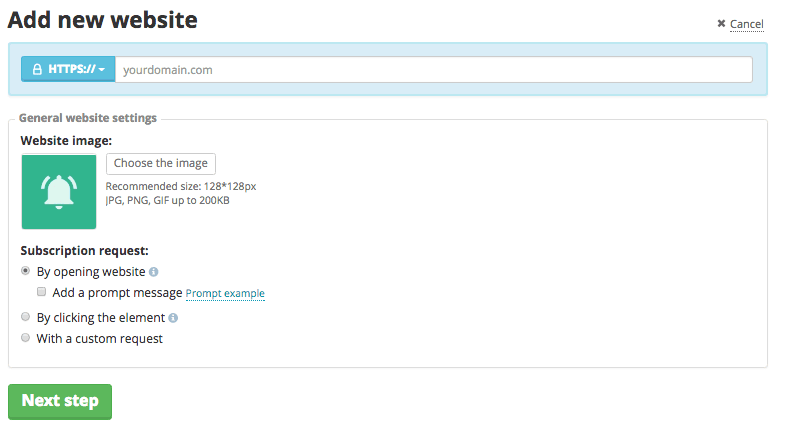 Next, you?ll be asked to add a code into your website template before the closing </head> tag. If you?re not a coder, then you can install Insert Headers and Footers plugin on your WordPress site, and insert the code.Once push notifications are enabled, you can leverage SendPulse?s REST API to integrate push notifications into your CMS, CRM, or other system. You can automatically send personalized webpush messages to your customers from the system you already use. To learn more about REST API, click here. If you haven?t signed up for SendPulse?s free account yet, you can do so by clicking on the link below. Compare the features that SendPulse provides with the features of your existing ESP. Who knows, you might just end up switching your email marketing service.

Digital Marketing For Small Businesses That Doesn’t Cost The Earth
The value of digital marketing for any type of business isn't something that can be debated any longer. We all know that millions of people use the internet, including social media regularly. However, the cost of digital marketing can seem prohibitive for smaller companies as they don't have the capital behind them to launch huge, flashy campaigns. But, in actual fact, you don't have to break the bank to get you digital marketing up to speed, just read on to find out more.Chat boxes First of all, why not consider installing a chat box on your website? Why? Well, they actually perform several marketing roles for you. Firstly they offer help to visitors of the sites, usually potential customers that need certain information before their visit turns into a sale. By providing this quickly and easily, you have a much better chance of gaining a sale than you would if you had no chat box.Secondly, chat boxes personalize an impersonal thing. Yes, it could be a bot on the other end and not a real person, but your customer doesn't know that. Instead, they see a company that is providing services tailored to them and their needs, and a way of getting the reassurance they need during the interaction. Something that less IT savvy customers can definitely appreciate. Charity donations A very simple way of raising your digital marketing game without it costing you very much at all is to include the option for you customers to provide a charity donation. You will see many successful companies doing this, including famous airlines. What this does is create a positive image around your company. It shows that you are concerned by things other than you own workings and profits, and it associates the said charity, and some of the good feelings your customer have about them, with you as well. The cost is minimal, because it the customer that is making the donation. So it's just the administration and web development fee to add a button to your site.
 Interactive and usable website Both of the above suggestions are dependent on your company having a website, something that demonstrates just how important websites actually are. They aren?t just another line of communication or a catalog of items. In fact, they really are the hub of all of your customer contact and your chief point of sale. All that means having an ugly, static, un-navigable website is very bad new for your businesses. So it's worth investing in the initial cost to have one built for you. You also need to think carefully about who you choose to host your website online. As poor hosting can result in all sort of problems like your site being unreachable, or it crashing if you have a lot of customers. Something that can directly affect your profit margins. Placement Lastly, a super cheap and easy way of getting some great digital marketing for free online is to send your products out to bloggers that appeal to your target audience. Then hopefully they will review your items (usually in a positive way, as no one wants to stop getting free products) and this reaches all of the people that follow them.

Software that makes Business Communication Hassle free
Software That Makes Business Communications EasierSmart company Intranet Is one of the foundations of a functional business, and this article explains how someone may create better communications with a few simple programs. Someone who wishes to invest in software today will find they have a number of options when they begin to research their choices. They will find that the company is much more efficient, and they will feel as though they are using their resources more wisely on a daily basis. 1: The Software Must Be Simple to UseEveryone in your office must be aware of how to use the software when you have it installed. There are many different people who will use the software to place calls or go on video conferences, and you must teach everyone how to use these items before you allow them to work. This is a simple process that may be completed quickly, and you will save yourself quite a lot of time when you are using the software correctly.2: The Software Must Do EverythingThere are many different things you may ask the software to do when you are working, and you may ask the software to do quite a lot of work for you every day. The software you use for communication will help you collect communications, phone calls and emails for your business. This is a storage program that will help you, and there are many different people who may access this information.3: The Software Can Be Integrated with Your DevicesYou may integrate your information with other programs that you use from your office phones to your computers. There are many different things that you may attach to the system that will go from the video panels and TVs in the office to the office phones and video phones. You may ask the installer to integrate everything for you, and you will find that the system is easier to access because it is all under one umbrella.
 4: Placing Conference CallsYou may use conference calls for all your distance employees, and you will feel as though you have everyone in the office even though they work in outlets around the world. It is quite important for people to ensure that they have a direct line of communication with the other people in the office, and you may ask anyone you like to join these calls at any time. 5: Video CallsVideo calls that you place with your clients and employees allow you to check in with them as many times as you like. There are many people who need to see you because they must get an idea of what is going on in the office. They will have many opportunities to judge your body language, and you may judge their body language when you are on video calls. Video calls are quite professional because you feel as though you are filling up the boardroom with many different people who are stakeholders in the company.
 6: EmailYou may create video emails and large presentations to your staff or clients through an integrated email system, and you will find that you may store all the emails you have sent through the same system. There are secure servers available to protect your information, and you may check any email you have sent in the past. This is a simple system to use, and it is far more efficient than using private email. You may build a work email system that gives everyone an address attached to your company's website, and you will provide a much more professional way for your staff to send emails.7: Using Secure LinesThe phone calls and video calls you place every day must be completely secure as you share sensitive information about your clients and the work you have done for them. Your intellectual property will be quite important to you, and you may keep someone from intercepting all the things you have said. It is much easier for you to have safe conversations when you have purchased a software program that will help you protect yourself from the hackers and corporate spies who are out there.8: Video PanelsYou may have video panels in your offices that offer presentation materials or share videos with your clients. You may integrate these panels with the presentations you wish to give, or you may go so far as to create video content that may be spread throughout the office. You may play the videos in your waiting room, and you may play the videos in any place you want in the office. You have a myriad of options to play videos once you have integrated with your communication software, and you may drag or drop the videos that you have just received from a staff member into the program.9: The Design of The ProgramYou must choose a program with an interface that you are comfortable using, and you will notice that there are many programs to choose from. They have their own designs that you must test, and you will be the most productive with the product you think works best for you. You will save yourself quite a lot of time when you are using the program because you know it works well for you. You may take the free trial of the program, and it will tell you which one you believe is the best choice for you.There are many different people who will be interested in ensuring that they have the best communications software for their offices, and you will find that you may choose from a number of programs that you realize are the easiest to use. You will save yourself quite a lot of money on the purchase, and you may use them for as long as you like when you are working in a large office. You have distance workers who need this software, and you have staff who much communicate more efficiently.

Your ultimate guide while dealing with Program Interface issues!
A Guide for Handling 5 Key Program Interface Development IssuesIntroduction Application Programming Interface, API, is a set of tools, routines, and protocols used to build software applications. It specifies the interaction between software components. You can as well use it to design the elements of GUIs (Graphical User Interfaces). A good API provides all software building blocks. All you have to do is put them together. APIs have become the primary channel used by large services to reach users. These services include Twitter, Facebook, Flickr, YouTube, Google Maps, and Netflix. The APIs handle more users than the front-ends of these online giants. It is no surprise then that by developing your API, you will significantly improve the quality and deliver-ability of your business? services.However, developing APIs can be a daunting task for beginners. This article covers some of the key API development issues you need to keep in mind and how to handle them.Importance of QualityProgram Interface's quality is crucial to the implementer and clients. High-quality APIs require less training, documentation and easily become popular. Additionally, they experience fewer support calls. To the customer, a poor quality API causes high defective rates and longer product development cycle. Fortunately, there are numerous tools you can utilize for to improve you API?s quality. Akamai for developers is one place where you can find the tools which will enhance your API?s usability.1. DesignIt is hard to use an interface that does not conform to the architecture of the applications for which you are building. If the application already depends on a particular API design approach, use the same design to create a new one.The design of most program interfaces uses REST or SOAP approaches. SOAP APIs focuses on remote procedures and process while REST is applicable for resources. If you are developing an API for exposing features and utilizes componentization, REST is the best option. 2. ProtocolsYou need to choose the right protocol for your API.HTTP/HTTPsHypertext Transfer Protocol, HTTP/HTTPs, is a protocol used to connect your program interface with web applications and users. If your application is to connect to a browser, you should use HTTP together with XML (Extensible Markup Language) or Hypertext Markup Language data formats to create a GUI. Alternatively, you can use it with JavaScript or JSON, JavaScript Object Notation, on the client devices.TCP and UDPTo separate Web activity and API traffic, you should use User Data Protocol, UDP, or Transmission Control Protocol, TCP, instead of Webport 80. However, this choice comes with firewall limitations which will require specific system configurations to navigate. The settings can expose your APIs to remote access.3. Data FormatsDeciding on the right data format for your API is crucial for proper information exchange and parameter expression. XML is a general data format that you can use in both SOAP and REST design approaches. But it is best for structure less data. For rigidly defined data elements like in RESTful approach, JSON is the best choice. It is easier to use and provides variable types used widely in API development.4. SecuritySecuring your application and its user is a primary concern for developers. When your app is not properly secured, malicious hackers can harm both your business and your clients. They can achieve this by creating a spoof app with malware, compromising your company?s backend network, intercepting sensitive information and much more. To for complete security, you should understand the real threats then secure your API, backend network, and user data. Below is a quick guide on how to achieve these.Understanding ThreatsThe deployment of Program interfaces can be internal or external. Each deployment model has its unique risks. Understanding these threats is necessary for helping you decide on effective security measure to implement. For example, external deployment exposes sensitive data to untrusted developers through the internet. In this case, you should use encryption or Transport Layer security to protect the data while in transit and at rest. Additionally, you should use dynamic and static code tools to test your API for OWASP top vulnerabilities. Also, conduct a periodical audit for abnormal behaviors on your API.API Authorization and AuthenticationThe best tool for securing your API is the Open Authorization, OAuth framework. OAuth.2 provides authorization constraints for mobile apps, desktop and Web applications and even Internet of Things. It achieves this via a 3-legged flow as follows; after a successful user authentication, the authorization server awards the native app an access token and a refresh token. The access token is used to access protected API resources. The refresh token renews the access token. The approach provides continuous user experience by eliminating the need to sign in repeatedly. When the tokens are compromised, you simply use the safety valve to revoke them.For sequential user authentication, you should use OpenID Connect. It comes together with the OAuth standard.Backend Network securityYou need to secure the servers and cloud servers accessed by your own API?s applications and third-party apps. Securing the servers prevents unauthorized access consequently protecting sensitive data. Use database encryption and encrypted connections to secure the network. Encrypted connections include Transport Layer Security, TLS, Secure Socket Layer, SSL and Virtual Private Network, VPN. Storing your documents in encrypted containers, a practice known as containerization, adds extra security. Additionally, you should spread your resources across different server, with separate keys. This measure is known as Federation.Besides these measures, have an internet specialist conduct a regular vulnerability assessment penetration testing of your network to ensure the integrity of your network security.Securing User DataToday most of the user?s data are stored on the local device. Leaky apps can release sensitive user information such as age, location, and device usage behavior. To secure your users, employ file-level encryption, encrypt device databases and eliminate the storage of sensitive information such as credit card details on the local device.- Testing
Best Shared Web Hosting

