Get The Most From Your New Website

Get The Most From Your New Website

Once you have had a new website designed and it?s live, how do you ensure that you are getting the maximum traffic and the highest conversion rates possible for your business? With promoting your site, there are a whole load of things to consider and simple ways to ensure you are reaching the right people. Follow these steps and be on the road to more hits than you can handle.
  • Know your Purpose
When deciding to have a website built, you will have certainly thought about what you are going to use it for and who you are trying to appeal to. When trying to direct visitors to your site, you must be able to implement this in an effective marketing strategy. If you are seeking page hits, then you are going to use a different strategy ? for example, your business plan on sales isn?t going to work. Make sure you keep this in mind before you launch any campaigns and certainly before you spend any money.
  1. Utilize Social Media
An obvious one, but not always put into practice effectively. Read up on the best ways to maintain brand identity across platforms, and make sure you do not publish contradictory information. The last thing you want to do is confuse potential viewers. If you are seeking visits to sell, make sure you are present in forums discussing the industry you are a part of. Never doubt that community can make or break a small business.
  1. Implement A Search Engine Optimization Strategy
If SEO sounds like a foreign term, you probably need to do your research. Getting traffic to your page is not about sitting back, crossing your fingers and hoping to the high heavens that somebody will stumble across your page. Whether it is running a blog, outsourcing some content or targeting particular geographic locations, you will need to understand a little about SEO to get those all important clicks.
  1. Make Sure Your Website Loads Well
A great looking, totally sleek website will not do much if whoever visits has to endure slow loading times and poor usability. More traffic than ever will be accessing your site from a phone or other small device, and so you need to find out if your website is up to the challenge. If not, you really must address this issue right away. You could potentially be losing half of your customers. Furthermore, if your website is slow to load, then your bounce rate will be artificially high. Look into the Best Web Hosting for your requirements; you will kick yourself if your server causes potential customers to leave, and a loss in sales.
  1. Keep it fresh
There is no point in having a website that you don?t update; therefore, make sure it stays in line with the times and that there are new backlinks promoting it as much as possible. Remember that repeat customers will see your website many times, and if nothing changes in a few months, they are likely to become disinterested. Unless you are using your website primarily as a CV, aim to update the content on it as often as you can.
Your Web Hosting search ends here

Your Web Hosting search ends here

Searching for the Perfect Home for Your Online Business: Web Hosting It might seem a bit intimidating when you first start the process of bringing your business online. Your head is spinning from the many options you see online. Where do you start? What is the best home for your business online? You know what you want your customers to see. You understand that it is not prudent to just put your website out there on the Internet by yourself.Web HostingWeb hosting solves many of the issues that website owners face to get attention and keep their website running 24/7. The web host can provide a home for your business online by giving your website an identity on the Internet and by maintaining the site 24/7. As you are aware there are many web hosts out there for you to choose from according to what you need. When you are first starting out online, the dazzling array of web hosting providers can be intimidating. Fortunately, there are quite a few web hosts that understand how intimidating these choices can be to someone who is starting a website for the first time.The nitty-gritty of web hostingWhen it all comes down to who you will select to host your website, the main thing to remember is that the web hosting provider is reliable. In other words, reviews of the web hosting provider are positive in three key areas.
  1. Uptime-You need to know if the web host's server has issues with maintaining websites 24/7. The better the score with keeping websites running smoothly, the more business you'll probably receive online.
  2. Ease of upgrades- This includes power upgrades and memory storage options with security features that protect sensitive information.
  3. Ability to create more than one domain name-This means that you can have more than one "home" on the Internet.
The choices you make for web hosting providers often come down to what you expect your website to do. All web hosting providers should provide you with basic web hosting features such as Cron and Server Side Include (SSI) that allow you operate and maintain the website.The Drivers-Shared, Dedicated, VSP or Cloud web hostingNow that you determined what you want in your website you next need to determine what type of web host provider you'll utilize for your website. Some of the drivers in this process are how advanced your IT knowledge is and cash flow. Other drivers are:Shared web hosting
  • Hosting ServersEase of installation and set up
  • Price
  • Flexibility of features
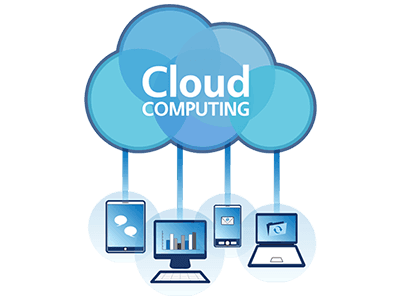
Shared web host providers are the cheapest in price and usually the easiest to install and update. Bluehost is the most popular shared web host because its powerful platform is easy to install and easy to update. The price is right for individuals or small businesses just starting out. The downside with shared hosting providers is that you are sharing space with other websites on the same server. There is also not as much security on shared hosting servers as there is on other hosting servers.Virtual Private Servers-web hostingVPS HostingThe biggest difference between shared web hosting and VPS web hosting is that it's more secure and more private. Each user receives his own slice of CPU time and space which is shared by the same server. This means that each user is responsible for what happens to their memory and has control over the content.The downside is that it is usually more expensive and time-consuming to install and set up. It also requires some technical knowledge to get the connections up and running to the server.Dedicated web hostingThis type of web hosting is for technical experts who want the responsibilities involved in running and maintaining their own websites. The biggest benefit is that you have control over your server and are in charge of everything that goes on it.The drawbacks are that whatever goes wrong is your responsibility to fix. This is the reason why it really isn't prudent to put your website out there all by yourself. There is also a higher cost involved with this type of web hosting.Cloud web hostingCloud web hosting has become very popular over the past five years or so. Cloud web hosting is different because there is no set server directing web traffic. Everything is done through a virtual interface which directs traffic and has unlimited memory capabilities. This type of web hosting can be either public or private. Public clouds are virtual clouds that gather public information and direct it instantaneously through the networks. Private clouds are more secure clouds that have gatekeepers for certain information.The beauty of cloud hosting is that you can be as flexible as you need to be with your data. Most cloud web hosts have a "pay as you use" program set up. The downside with this type of web hosting is the fact that it is still considered very insecure.Figuring out What You Need for Your WebsiteAn important element to figuring out what you need for your website is determining your platform. The foundation of your home online should be solid enough to withstand frequent use. If you're not sure at this point what you need for a good platform, you might want to consider utilizing a web host provider that offers an "all-in-one" plan like the one offered by iPage. All-in-one plans take the guesswork out of creating the perfect website with the tools you need to ensure your website is running efficiently. When researching this plan you definitely need to consider how you are going to use the website.The flexibility of clouds is probably the best reason to choose this type of web hosting. The stability of a dedicated web host is why you'd choose this type of web hosting. Beginners are best served with shared or cloud web hosting for their websites.
How to Design a Tech Friendly Office Space

How to Design a Tech Friendly Office Space

Long gone are the days when office workers had to carry around projects, presentations and documents in hard copy, to each meeting they attended. The Modern workplace should be lighter and more minimal than the office of the 80s. Developments in technology have helped to remove clutter from our work spaces and free us from the infinite paper-trail of the past. Whether it is how work is done or the way we communicate, tech is an ever-prevalent benefit for the modern worker. That is, assuming you know how to best implement the technology in a functional way. If you are struggling to create a tech-friendly office space and need some pointers, read on.Speed up First and foremost, office managers must ensure that all the computers are operating at optimal speed. There are few things less frustrating than a slow computer, especially if you have a deadline to meet. If your computer is lagging, check to see how much RAM is available. Before you bin an underperforming machine, consider the addition of more RAM. Companies such as Offtek sell RAM for a multitude of devices, it might be the solution to your computer crisis. Replacing one or two computers might be feasible, but when thinking about upgrading the whole office updating your existing hardware can often be the best option.Don?t stick to office devicesAllowing employees to work from their own laptops, tablets, and smartphones is recommended. Not only do people feel as though they have more freedom and flexibility, often they are going to feel more comfortable working from devices they?re familiar with rather than office-based equipment. To ensure that this kind of policy works for your business put a system of checks and balances in place to ensure that any work or data set is secure if accessed from another device. While bringing in other devices can promote freedom and save money, it must be done in the right manner. ???Operate in the cloud While sending documents via email is still a viable option, cloud based technology is fast becoming the easiest way to share files. File sharing of this kind allows for easy distribution of tasks and nurtures collaboration between colleagues and clients. Making a simple edit to a piece of work now takes significantly less time. Using the Cloud is a fast way to promote engagement from staff and manage your files. If you have not updated your operations to include the cloud yet, do it now. Utilize streamlined softwareThanks to the rise of modern technology, there are many pieces of software that can be used to streamline tasks in the workplace. In terms of conversing between employees, there are various real-time communication tools such as HipChat, that allows everyone to stay connected at the same time. This obviously helps with being able to discuss work-related topics immediately, and also means that meetings can become a thing of the past. There also many other pieces of software that your business can take advantage of to improve efficiency. For example, programs like Trello assist in keeping track of all tasks that need to be completed, while there are various accountant-related software packages that make crunching those numbers so much easier.
SendPulse Review: More than Just an Email Marketing Software

SendPulse Review: More than Just an Email Marketing Software

SendPulse combines email service, web push notifications, and SMS into one powerful product that?s not just packed with features, but is insanely affordable. Seriosuly! When you register for SendPulse?s free plan, you get access to the following:
  • Email Marketing - You can create and send emails with SendPulse?s easy-to-use drag and drop editor or you could simply use one of their predesigned email templates and customize them as per your requirements.
  • SMTP Service - SMTP is used to send transactional and marketing email messages from any of your tools or applications using SendPulse.
  • Web Push - Web push notifications are instant messages that you can send to your subscribers? devices.
  • SMS - SendPulse also allows you to send SMS messages to your subscribers with a speed of 200?500 SMS/second on over 800 networks in over 200 countries around the world.
  • REST API - SendPulse?s REST API gives engineers full control and endless managing capabilities.
Best of all? You can experience most of what SendPulse has got to offer immediately after signing up for their free plan. In other words, none of the key features from web push notifications to email autoresponders are hidden behind a paywall. The only restriction with the free plan is that you can only send up to 15000 emails in a month to up to 2500 subscribers. Once you cross this limit, you have to sign up for one of their paid plans which start from $9.85/month. (See below)Email ServicesWhile affordability and features such as SMS and SMTP server set SendPulse apart from other ESPs in the market, the one feature that will appeal to most marketers is the ability to send push notifications to subscribers. Let?s take a closer look at web push notifications.

Using Web Push Notifications on SendPulse

If you aren?t familiar with web push notifications, these are instant messages that you can send to your subscribers? devices. Push notifications look like SMS text messages, but they only reach users once they have opted in to receive your messages. You can use web push notifications to:
  • Promote your products or services to increase sales
  • Provide customer support
  • Convert unknown users to known customers
  • Send transactional receipts instantly
  • Drive users to other marketing channels
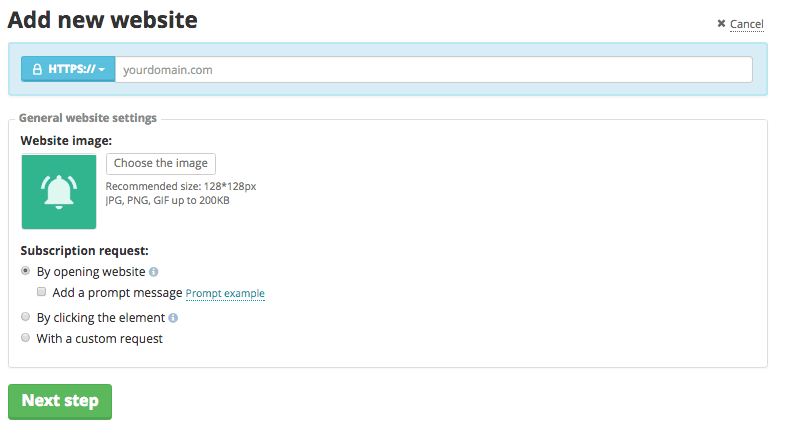
To enable push notifications on your website, login to your SendPulse account and navigate to ?Push? from the top menu bar. Next, click on ?Add Website? and enter all the details.add new websiteNext, you?ll be asked to add a code into your website template before the closing </head> tag. If you?re not a coder, then you can install Insert Headers and Footers plugin on your WordPress site, and insert the code.Once push notifications are enabled, you can leverage SendPulse?s REST API to integrate push notifications into your CMS, CRM, or other system. You can automatically send personalized webpush messages to your customers from the system you already use. To learn more about REST API, click here. If you haven?t signed up for SendPulse?s free account yet, you can do so by clicking on the link below. Compare the features that SendPulse provides with the features of your existing ESP. Who knows, you might just end up switching your email marketing service.
Digital Marketing For Small Businesses That Doesn’t Cost The Earth

Digital Marketing For Small Businesses That Doesn’t Cost The Earth

The value of digital marketing for any type of business isn't something that can be debated any longer. We all know that millions of people use the internet, including social media regularly. However, the cost of digital marketing can seem prohibitive for smaller companies as they don't have the capital behind them to launch huge, flashy campaigns. But, in actual fact, you don't have to break the bank to get you digital marketing up to speed, just read on to find out more.Chat boxes Bubble QuoteFirst of all, why not consider installing a chat box on your website? Why? Well, they actually perform several marketing roles for you. Firstly they offer help to visitors of the sites, usually potential customers that need certain information before their visit turns into a sale. By providing this quickly and easily, you have a much better chance of gaining a sale than you would if you had no chat box.Secondly, chat boxes personalize an impersonal thing. Yes, it could be a bot on the other end and not a real person, but your customer doesn't know that. Instead, they see a company that is providing services tailored to them and their needs, and a way of getting the reassurance they need during the interaction. Something that less IT savvy customers can definitely appreciate. Charity donations A very simple way of raising your digital marketing game without it costing you very much at all is to include the option for you customers to provide a charity donation. You will see many successful companies doing this, including famous airlines. What this does is create a positive image around your company. It shows that you are concerned by things other than you own workings and profits, and it associates the said charity, and some of the good feelings your customer have about them, with you as well. The cost is minimal, because it the customer that is making the donation. So it's just the administration and web development fee to add a button to your site. Ipad & KeyboardInteractive and usable website Both of the above suggestions are dependent on your company having a website, something that demonstrates just how important websites actually are. They aren?t just another line of communication or a catalog of items. In fact, they really are the hub of all of your customer contact and your chief point of sale. All that means having an ugly, static, un-navigable website is very bad new for your businesses. So it's worth investing in the initial cost to have one built for you. You also need to think carefully about who you choose to host your website online. As poor hosting can result in all sort of problems like your site being unreachable, or it crashing if you have a lot of customers. Something that can directly affect your profit margins. Placement Lastly, a super cheap and easy way of getting some great digital marketing for free online is to send your products out to bloggers that appeal to your target audience. Then hopefully they will review your items (usually in a positive way, as no one wants to stop getting free products) and this reaches all of the people that follow them.